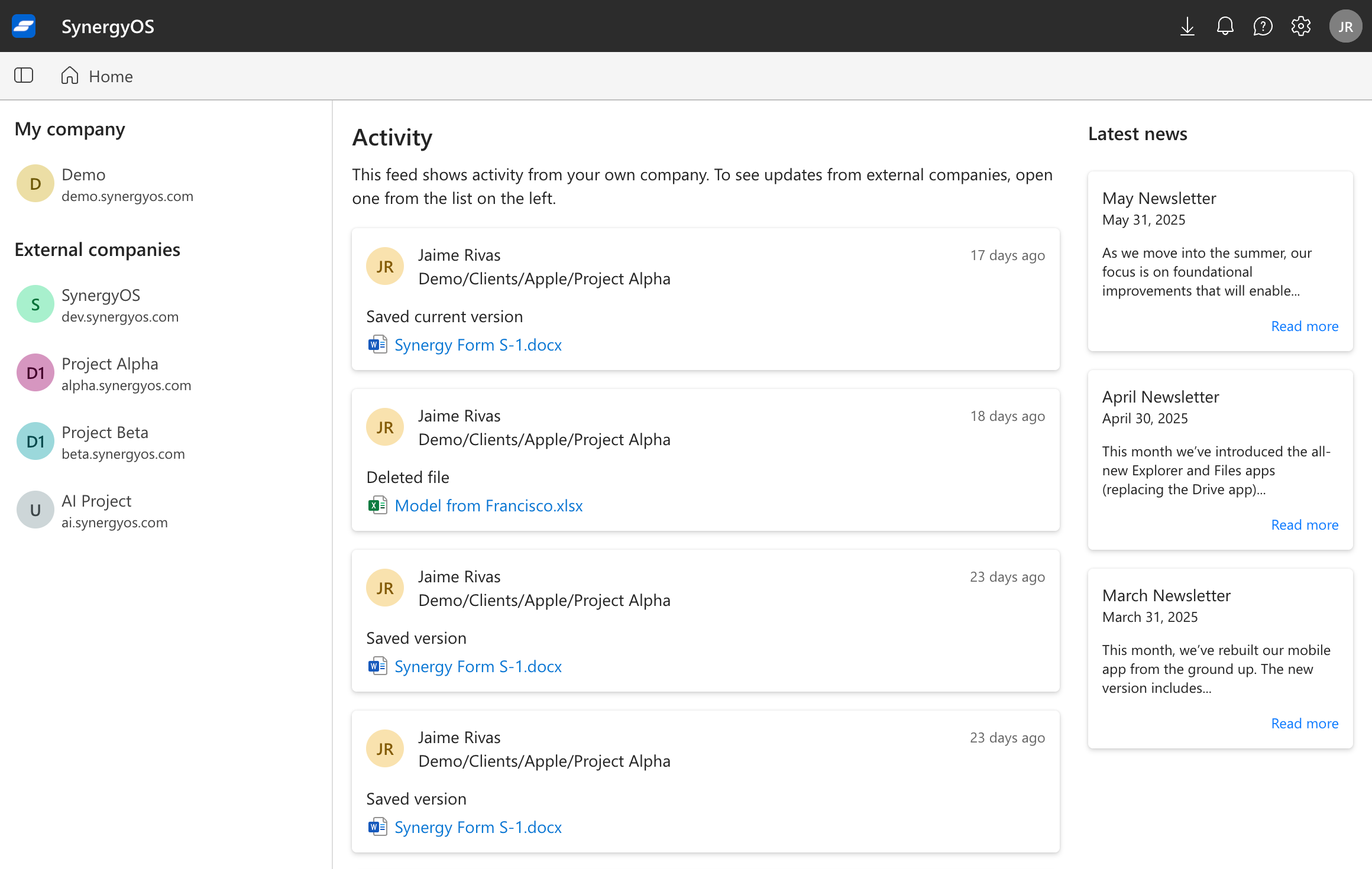
March 2026 Newsletter

Jaime Rivas
Founder of Synergy

2026-03

Welcome to the SynergyOS Monthly Newsletter for March 2026

March continued the same clear direction: we are working toward FedSP as the next major foundation for SynergyOS.

The work is still mostly under the surface. That is exactly where it should be at this stage. Before FedSP becomes part of the product experience, we need the protocol, operations, and platform behavior to be solid.

February 2026 Newsletter

Jaime Rivas
Founder of Synergy

2026-02

Welcome to the SynergyOS Monthly Newsletter for February 2026

February was another infrastructure-heavy month for SynergyOS. Our main focus stayed on FedSP, with work aimed at making the protocol easier to validate, easier to operate, and safer to evolve.

There is no big product announcement this month. That is intentional. We are still in the phase where the right thing to do is make the foundation stronger.

January 2026 Newsletter

Jaime Rivas
Founder of Synergy

2026-01

Welcome to the SynergyOS Monthly Newsletter for January 2026

January was a continuation of the work we started at the end of 2025: building toward FedSP, our federated sync foundation for secure, auditable, cross-organization collaboration.

We do not have a large feature launch to announce this month. Instead, the team focused on the kind of work that matters before a protocol becomes part of the core platform: correctness, reliability, performance, and fixing the rough edges we already know about.

December 2025 Newsletter

Jaime Rivas
Founder of Synergy

2025-12

Welcome to the SynergyOS Monthly Newsletter for December 2025

As we wrap up 2025, this end-of-year update is focused on one theme: FedSP—our work on a federated sync foundation for secure, auditable, cross-organization collaboration.

November 2025 Newsletter

Jaime Rivas
Founder of Synergy

2025-11

Welcome to the SynergyOS Monthly Newsletter for November 2025

This month we made a major upgrade to the SynergyOS AI Copilot using OpenAI’s new Agents SDK, and invested in performance and reliability behind the scenes.


AI Copilot Upgrade · OpenAI’s new Agents SDK

We rebuilt key parts of the Copilot on OpenAI’s new Agents SDK to support more capable, multi-step workflows while keeping the experience fast and predictable.

Highlights:

  • Better task follow-through: improved planning and execution for longer, multi-step requests.
  • Richer tool use: more reliable handoffs between the Copilot and product actions.
  • More consistent outputs: fewer “almost right” answers and cleaner final results.

We’ll keep iterating on quality and add more agentic workflows over the coming months.


Platform Updates · Backend Improvements

Alongside new features, we’re continuing to harden the platform. Put simply: we are doing backend improvements.

This month’s work focused on:

  • Faster, more reliable sync: reduced tail latencies and improved resilience during intermittent network conditions.
  • Operational visibility: better tracing and alerting so we can detect issues earlier and resolve them faster.
  • Safer releases: incremental rollout improvements to reduce risk during deployments and migrations.

These changes aren’t always flashy, but they add up to a noticeably smoother experience—especially for busy teams and high‑activity workspaces.


Roadmap

In December we’re focusing on:

  • Core platform: continuing performance, stability, and scaling work.

The SynergyOS Team

October 2025 Newsletter

Jaime Rivas
Founder of Synergy

2025-10

Welcome to the SynergyOS Monthly Newsletter for October 2025

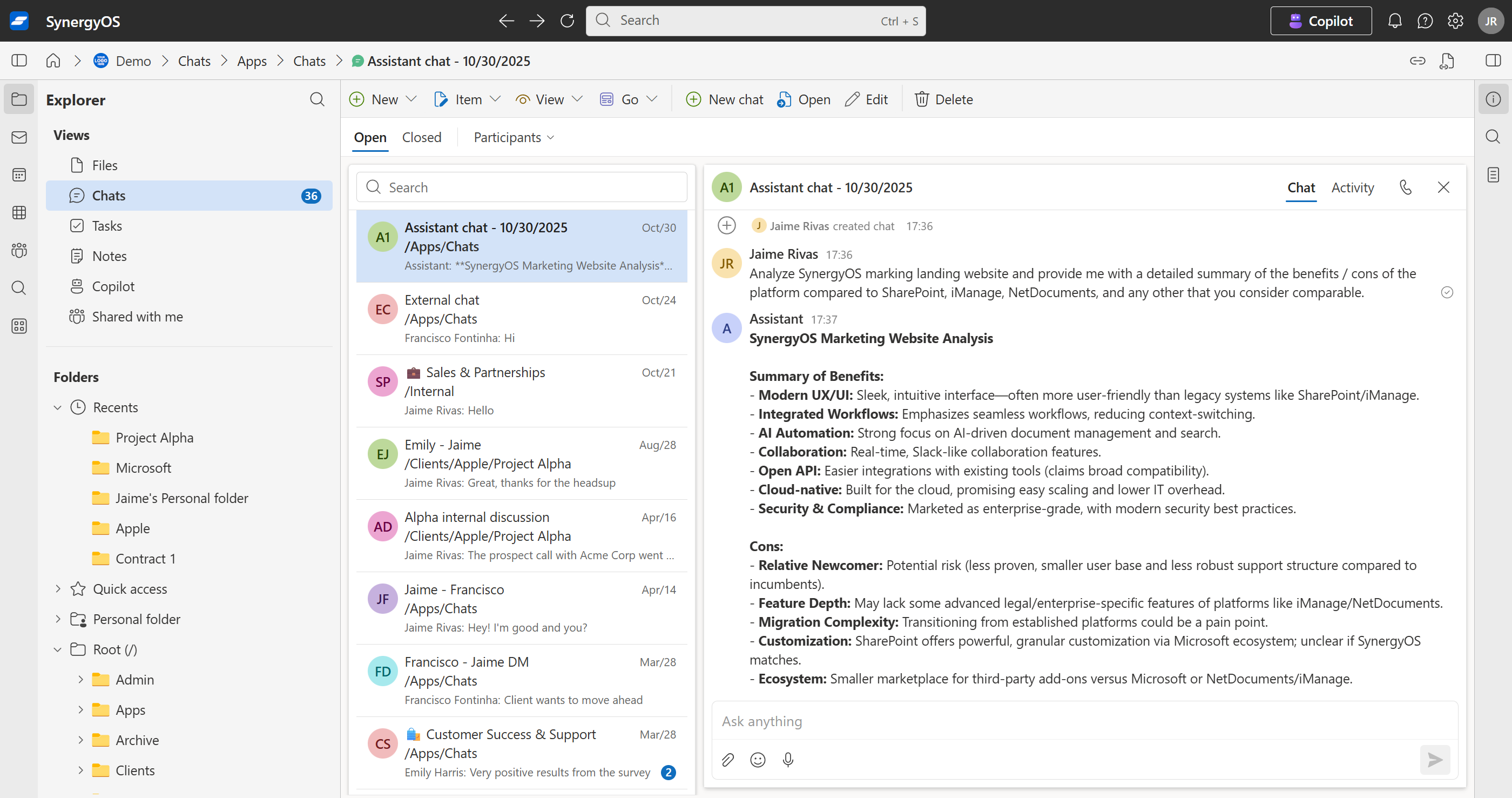
Welcome to the SynergyOS Monthly Newsletter for October 2025. This month we’re releasing a major upgrade to the AI Copilot with OpenAI’s new Agents SDK.


AI Copilot Chats

We upgraded SynergyOS Copilot with multi-step planning, tool use, longer context, and smoother streaming. It works inside Chats and respects your organization’s permissions, retention, and audit policies.

Chat

What you can do

  • AI chat, saved in your folders
    Start a ChatGPT-style conversation that lives inside any SynergyOS folder. Your team can revisit, continue, and reference it later, just like any other item.
    Use it for: brainstorming, drafting, quick research.
    Tip: reference one or more files to compare; Copilot highlights differences and suggests review points.

  • “Summarize this file” and write to the item description
    Copilot reads a file, generates a concise summary, and saves it into the Description field. This boosts discovery because you can filter and search just the description field for faster retrieval. Prompt: “Summarize this PDF and save to Description.”

  • Automatic tagging (keywords or controlled taxonomy)
    Copilot proposes tags from content or applies tags from your pre-defined, customer-defined list. Works on single files or in bulk. Prompt: “Tag these docs with relevant topics; use our official taxonomy where possible.”

  • Natural-language actions inside Synergy
    Ask for operations and Copilot generates deep links with the right query parameters so you can click and execute. Examples:

    • “Search for NDA and termination within /Clients/Acme.” → Copilot returns a ready-to-open search URL.
    • “Show items tagged renewal-risk in /Legal/2025.” → one-click filtered view.
    • “Create a note titled Q4 legal risks in /Board/Prep with these bullets.”
  • Thread summaries and follow-ups
    Summarize long discussions and draft replies in your tone. Prompt: “Summarize this thread for the exec channel and propose next steps.”

  • Fact pulls with citations
    Ask questions and Copilot extracts answers from shared files with inline citations back to the sources. Prompt: “From the latest MSA and SOW, what are termination rights? Cite the clauses.”

  • Translate and adapt
    Convert messages for different audiences or languages while preserving intent. Prompt: “Rewrite this update for a client-facing tone in Spanish.”

  • Turn decisions into tasks or notes
    Capture outcomes directly from chat into tasks or notes in the right folder, with assignees and due dates if you specify them. Prompt: “Create a task Review Acme renewal redlines for Marta due Friday in /Clients/Acme/Renewal.”

Governance and audit

  • Data stays in your SynergyOS server. Copilot conversations and outputs are stored as items in your folders.
  • Commit / Audit trail by default. Actions, summaries, tags, and anonymizations are recorded with who, what, and when. It uses the same commit-based system as all user actions.
  • Permissions-aware. Copilot can only access and act on what the user is allowed to see.

Roadmap

In November we’re focusing on:

  • Copilot: additional functionalities.
  • Chats:: improvement and new features.
  • Enhanced onboarding: simplified onboarding and invite flows.

The SynergyOS Team

September 2025 Newsletter

Jaime Rivas
Founder of Synergy

Welcome to the SynergyOS Monthly Newsletter for September 2025

Delegated user management, faster streaming downloads, refreshed chats with voice notes and mobile capture, plus a new native PDF viewer for iOS and Android.
2025-09


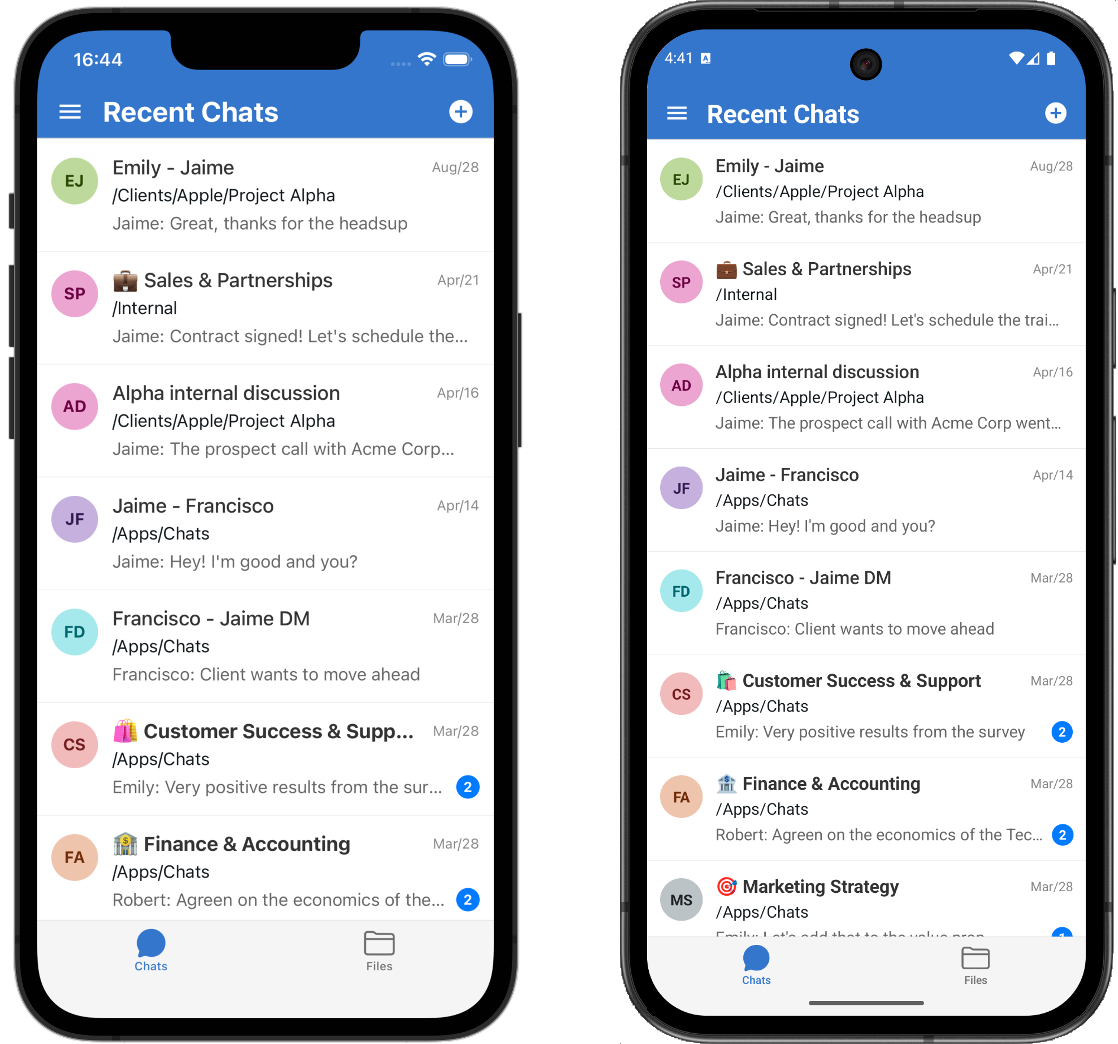
Chat improvements in desktop and mobile

A set of upgrades focused on familiarity, speed and mobile capture.
mobile

A more familiar design

Chats now mirror modern messaging apps for quicker scanning and lower cognitive load.

  • Modern bubble layout with clearer grouping, timestamps and compact spacing options.
  • Avatars and names aligned like WhatsApp or Messages for instant scanability.
  • Message actions on hover/tap for Quote ↩, Copy link, and React.
  • Optional delivery indicators per conversation, including sending and delivered.
  • Markdown-first composer with inline formatting for bold, italics, lists and code.
  • Typing indicators to feel more immersed in the conversation.

Voice notes

Capture quick context with tap-to-record voice notes, waveform playback, and background uploads.

  • Press to record, slide to cancel, or lock to record hands-free.
  • Inline playback with scrub, duration and waveform animation.
  • Automatic upload with progress and background completion on mobile.

Share photos, videos and files instantly from camera, gallery, or the system Files picker.

  • Capture from camera or pick from gallery without leaving the chat.
  • Attach files from the system Files app.
  • Previews before sending for photos and videos.
  • Resilient uploads with visible progress and safe retries on flaky connections.

Mobile: new PDF viewer in iOS and Android

Opening PDFs in mobile is now much faster and smoother.

  • iOS: Uses the native Quick Look viewer for crisp rendering and smooth scrolling.
  • Android: Uses the latest AndroidX PDF components for efficient paging and zoom.

Developer references for the underlying viewers:


User Management: delegate user and group management

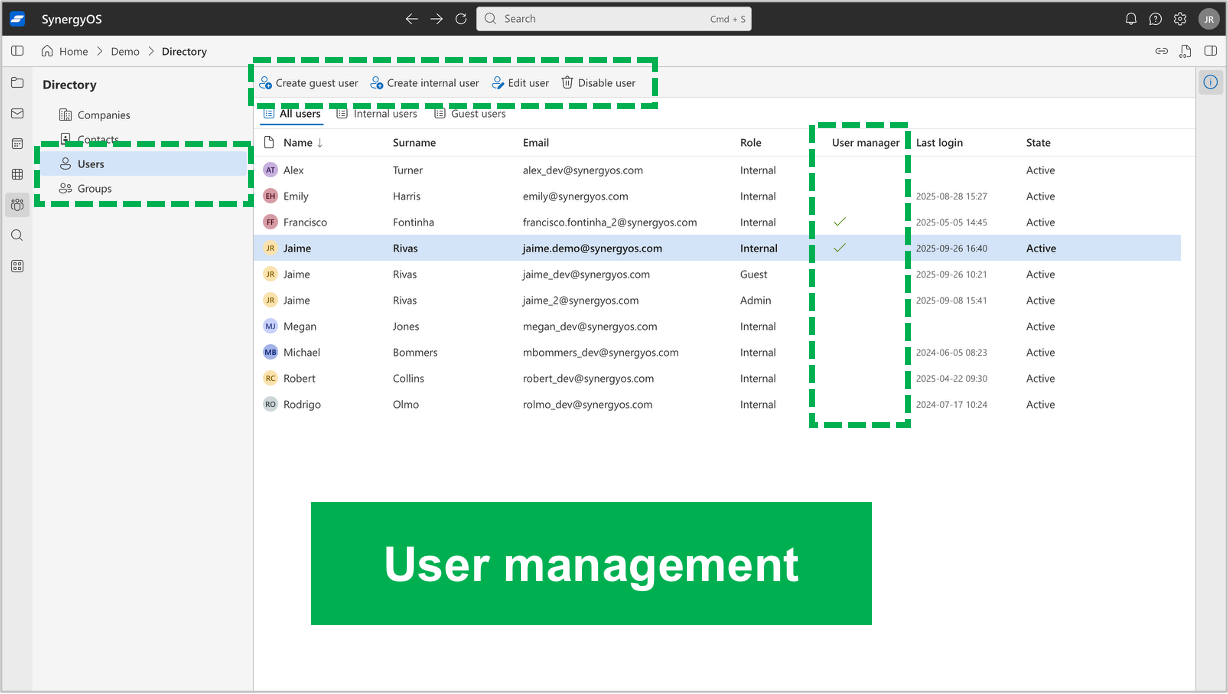
Admins can assign the User Management capability to internal users so they can handle routine changes in Directory without contacting an admin.

  • Open Directory to manage Users and Groups in one place.
  • Admins can grant User Management to selected teammates.
  • Delegated users can create, edit, and disable internal users and groups directly.
directory-user-management

Admins: How to enable it

  1. Open Directory.
  2. Go to Users.
  3. Select the users you want and check User Management.

Delegated users: How to use it

  1. Open Directory and choose Users or Groups.
  2. Use New, Edit, or Disable to make changes.
  3. Review and Save. Updates apply right away.

Use cases

  • Faster onboarding for new hires and contractors.
  • Keep groups aligned with current teams and projects.
  • Immediate access removal during offboarding.

Notes

  • Only internal users with User Management will see these controls.
  • Admins retain control and can grant or revoke this capability at any time.

Tip: Grant User Management to HR or team leads to keep org changes current without bottlenecks.


Download improvements

Downloads now use native browser APIs and true streaming. When you can select multiple items and click on Download, the ZIP is assembled on the fly and streamed as it is produced, which shortens perceived wait time for large exports. The result:

  • Faster start. Multi-file downloads begin immediately. No more waiting while a ZIP is prebuilt on the server.
  • Lower friction. Progress, pause, resume and cancel are handled by your browser’s own download manager.
  • More reliable at scale. Large, multi-GB folders download steadily without the “one big wait, then everything at once” experience.

Roadmap

In October we plan to work on:

  • Chats: many new features coming up.
  • Enhanced onboarding: clearer first-run defaults and simplified invite flows.

The SynergyOS Team

August 2025 Newsletter

Jaime Rivas
Founder of Synergy

Welcome to the SynergyOS Monthly Newsletter for August 2025

This month we focused on practical improvements to collaboration and ongoing backend work that strengthens reliability and performance. Highlights below.

2025-08


App redesign

We consolidated navigation to reduce context switching.

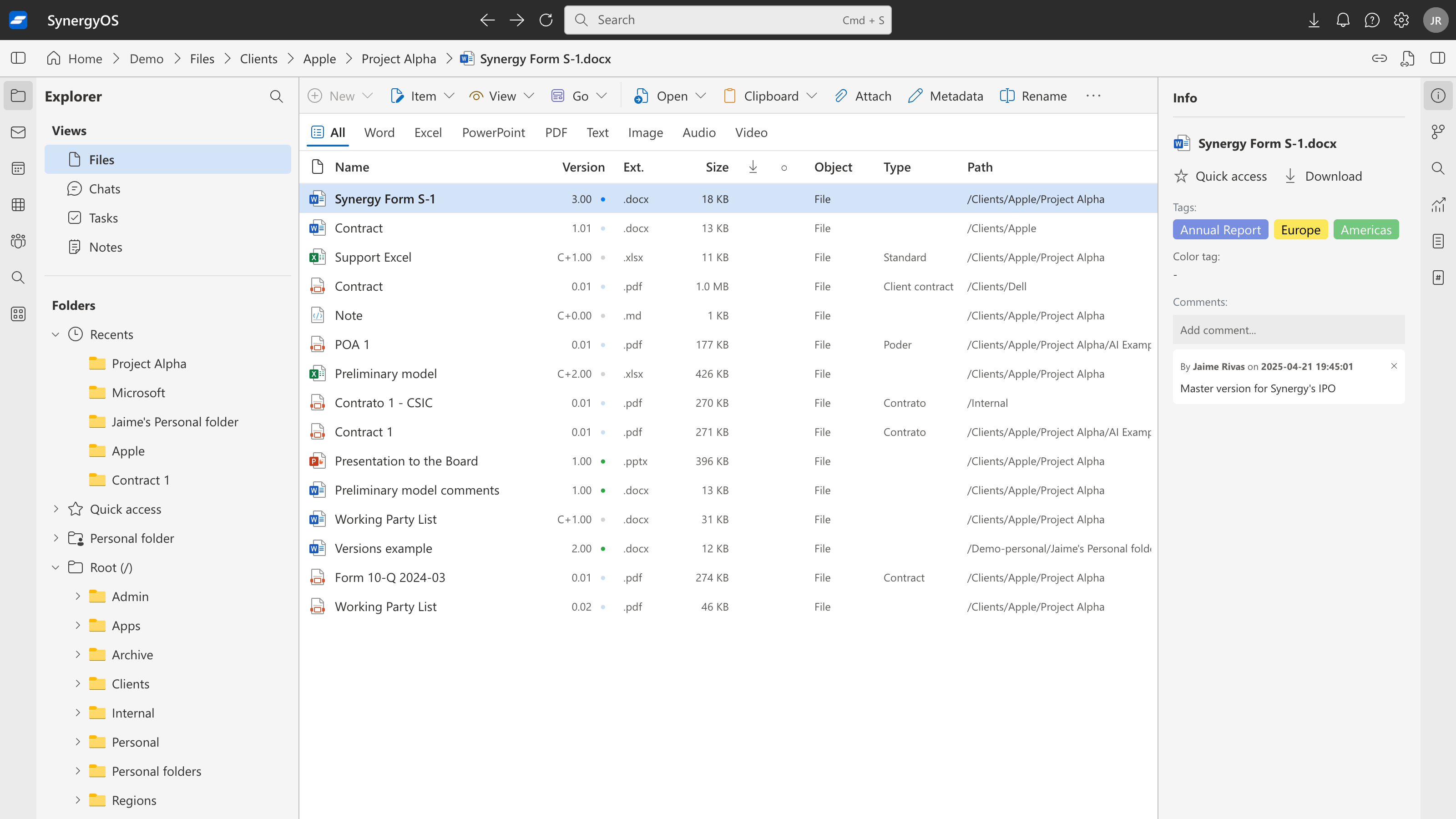
  • Chat, Notes, and Tasks are now inside Explorer. You will find a new Views section that surfaces your Recent Chats, Recent Notes, and Recent Tasks in one place.
  • This keeps you anchored in the folder structure while you browse or act on related items, without hopping across tabs.

app-redesign

How to use it

  1. Open Explorer.
  2. In the left pane, expand Views to see Recent Chats, Recent Notes, or Recent Tasks.
  3. Select a view to filter the list pane instantly.

Customize navigation sidebar

You can now tailor Explorer to match how you work.

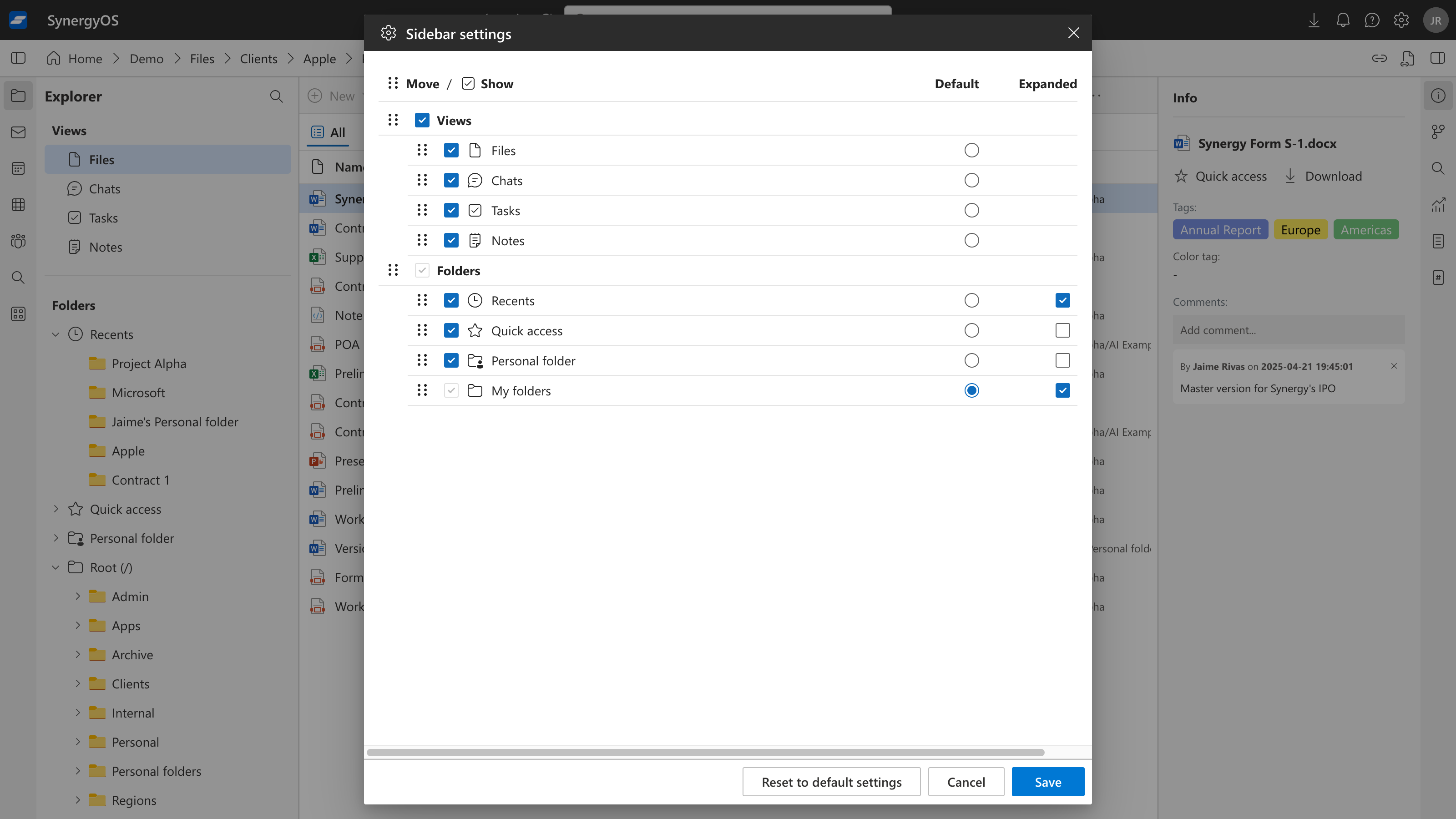
  • Click the Sidebar settings button in Explorer.
  • Reorder sections by drag and drop.
  • Show or hide sections you do not use.
  • Choose the default selection when Explorer opens.
  • Set which sections are expanded by default.

sidebar-settings

Tip: Create a lightweight “home” by keeping just a few high-value sections visible and expanded.


Activity inside Explorer

Folder activity is now available where you need it.

  • Open any folder in Explorer.
  • The default view shows items in that folder.
  • Click Activity in the filters toolbar to switch to the recent activity feed for that folder.
  • Switch back to Items at any time. No separate tab, no context loss.

activity

Use cases

  • Quick audits before sharing a folder.
  • Catch up on edits and comments after time away.
  • Verify recent changes before sending a link.

Documentation at the bare domain

We consolidated our docs and began expanding learning materials.

  • All documentation now lives at: https://synergyos.com/docs/.
  • We added a new Tutorials section and are preparing a Quickstart onboarding path so new users can follow a simple set of steps from first login to first value.

Bookmark: https://synergyos.com/docs/tutorials/


Backend improvements

We continued infrastructure work aimed at long-term stability and performance.

  • Hardening services and APIs used across apps.
  • Improving monitoring, logging, and fault tolerance.
  • Internal performance sweeps to reduce latency and smooth peak loads.

These changes are mostly behind the scenes but support faster, more predictable behavior at scale.


Roadmap

Planned for September:

  • Ongoing backend upgrades to support future features.
  • Enhanced onboarding flows.

If you have feedback, let us know. Your input helps us prioritize what matters most.

The SynergyOS Team

July 2025 Newsletter

Jaime Rivas
Founder of Synergy

Welcome to the SynergyOS Monthly Newsletter for July 2025

This month’s work centered on practical improvements to collaboration and ongoing updates to our backend infrastructure. Below is a summary of what’s new and what we’re working on.

2025-07


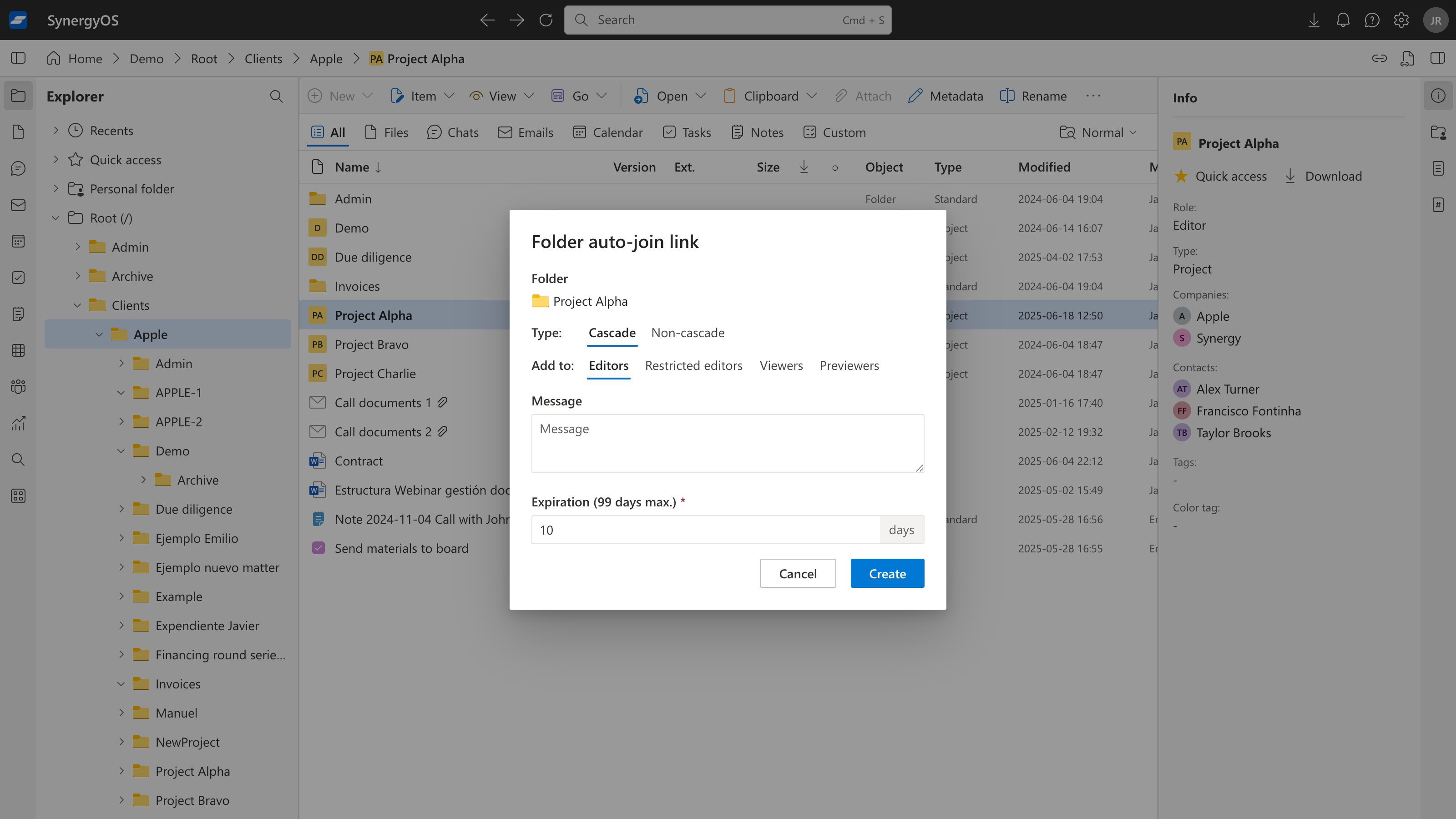
We introduced Folder Auto-Join Links to make it easier to invite many users to a folder at once:

  • Bulk invitations: You can now generate a unique link for any folder, select the type of access (including whether permissions should cascade to subfolders), and specify the user role (Viewer, Editor, etc.).
  • Simple onboarding: Share the link with anyone—once they follow it, they’re immediately added to the folder with the designated permissions, removing the need for manual invitations or approvals.

This is particularly useful for onboarding entire teams, granting access to external collaborators, or reorganizing folder permissions during project changes.

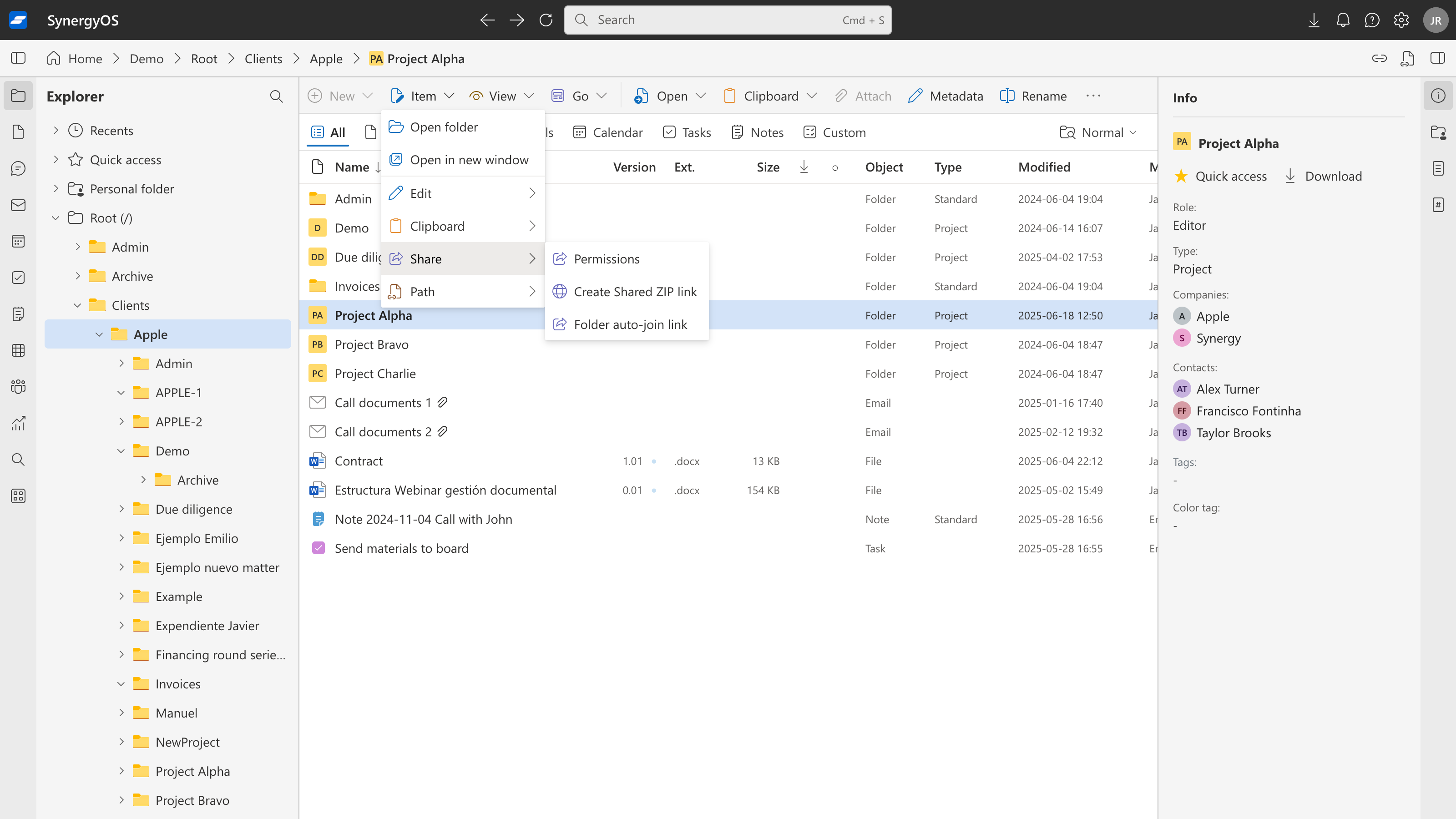
Let's see how it works. First, select the folder and click on Share > Folder auto-join link:

1

Then, select the type of access and role:

2

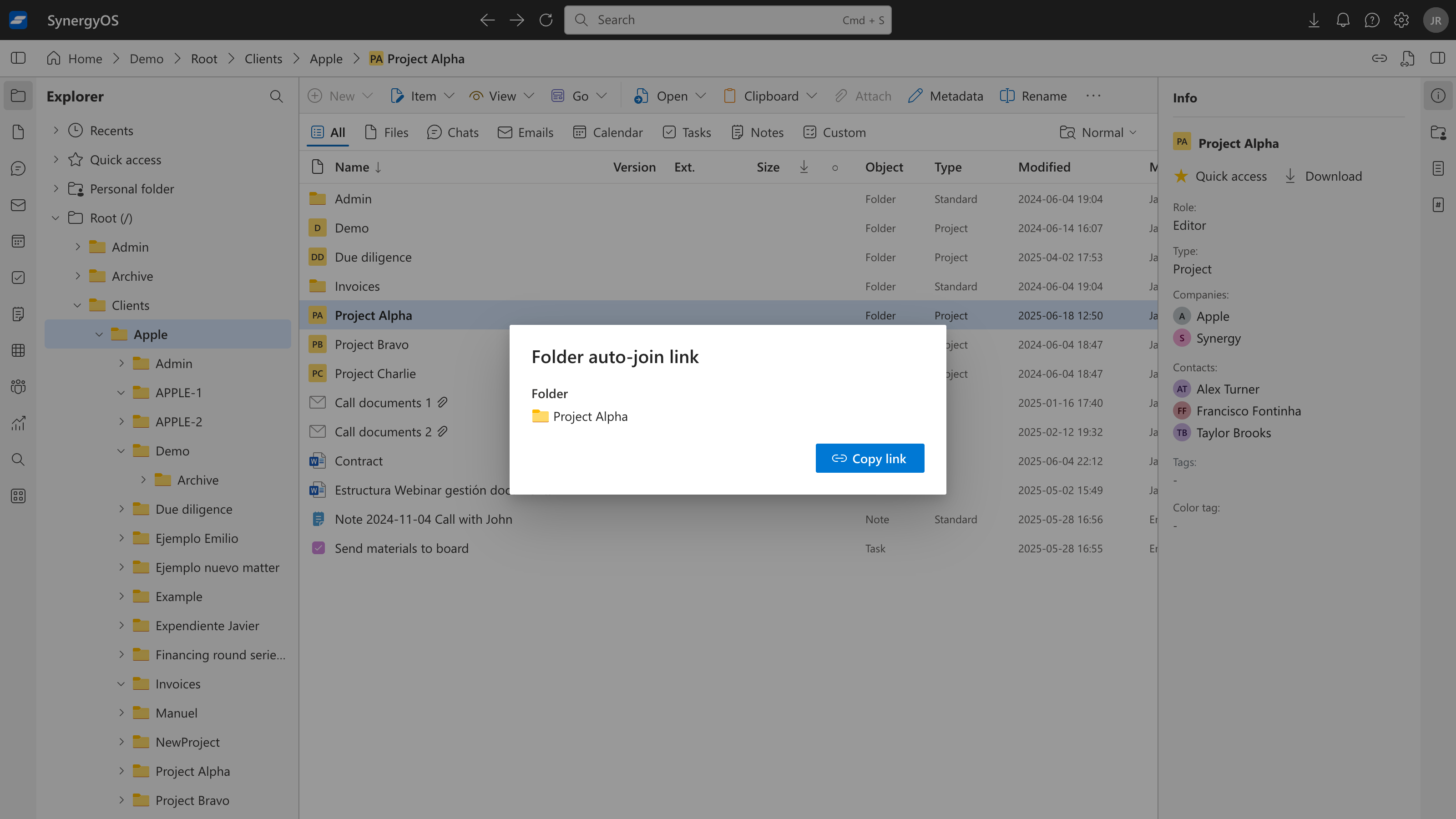
Now, copy the link and send to anyone via email or chat:

3

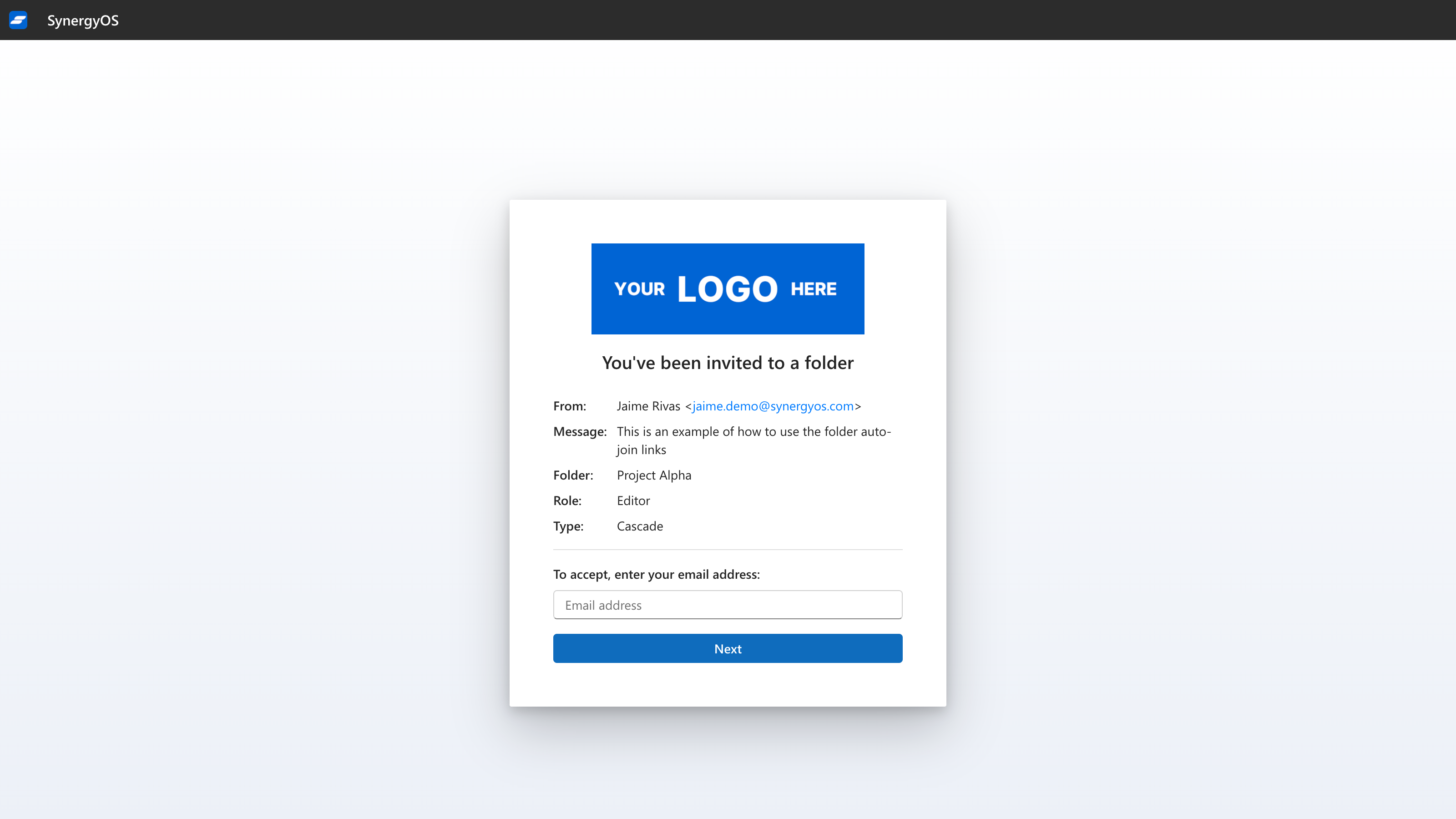
The recipients can open the link and complete the log-in and acceptance flow to access the folder:

4


Backend Improvements: Infrastructure and Reliability

Much of July’s work was focused on infrastructure. These improvements are not directly visible to end users but are important for long-term stability and performance:

  • Service reliability: We have continued refactoring parts of our backend codebase to make the platform more robust.
  • Scalability: Changes have been implemented to handle larger organizations and higher usage without performance degradation.
  • Preparation for upcoming features: These upgrades are also necessary groundwork for features on our roadmap, such as expanded sharing and federation.

Roadmap

Planned for August:

  • Ongoing backend upgrades to support future features.
  • Enhanced onboarding flows.

If you have feedback, let us know. Your input helps us prioritize what matters most.

The SynergyOS Team

June 2025 Newsletter

Jaime Rivas
Founder of Synergy

Welcome to the SynergyOS Monthly Newsletter for June 2025

This month, we rolled out a centralized user system, delivered the first stage of personal accounts, and launched a unified workspace switcher. Major steps toward a more open and connected SynergyOS.

2025-06


Unified Navigation & Repo Switcher

The new home screen and navigation model are live. Switching between all workspaces and repositories—business or personal—is now seamless.

  • Effortless switching: Move between projects, teams, and accounts from a single place, across all platforms.

home


Centralized User & Group Management Now Live

The new Common Infrastructure for authentication and user management is now fully deployed across all cloud regions. All organizations—SaaS, dedicated, or self-managed—now authenticate via a unified service.

  • Instant onboarding: Invite guest users and partners from any SynergyOS deployment. No more duplicate user records.
  • Future-ready: This is the backbone for the upcoming Synergy Federated Network, enabling seamless, secure cross-company collaboration.

Early Access: Personal Accounts

Personal account sign-up is now available to select early users. This is the first step toward making SynergyOS accessible beyond organizations.

  • Direct sign-up: Anyone can create an account and receive a personal workspace.
  • Unified experience: Personal and organizational workspaces are accessible from a single interface.

A broader rollout is planned for the coming months.


Roadmap

In July, we’ll continue refining the shared infrastructure and workspace switching experience. Next on the horizon:

  • Expanded access to personal accounts
  • Beta of federated invitations between organizations
  • Enhanced onboarding flows

We value your feedback and encourage you to share your thoughts on these latest updates. Your insights help us make SynergyOS the best it can be.

Stay tuned for more updates, and thank you for being a part of the SynergyOS community!

The SynergyOS Team