Overview & Architecture
Welcome to the SynergyOS Admin Guide
This guide is for administrators, IT teams, and technical decision makers who want to understand, deploy, and manage SynergyOS for their organization.
Sections
- Infrastructure & Deployment – Planning, requirements, and setup
- Platform Components – Core modules, apps, services, and integrations
- Admin Center – Day-to-day admin tasks, user/org management
- Security & Compliance – Permissions, audit, and governance
- Open API – Integrate with your existing systems
Architecture (High-Level)
To accommodate diverse enterprise needs, SynergyOS is built with a scalable, modular architecture that separates concerns across data storage, application services, and integrations. This high-level overview highlights the key layers and how they interact to deliver performance, extensibility, and enterprise-grade security.
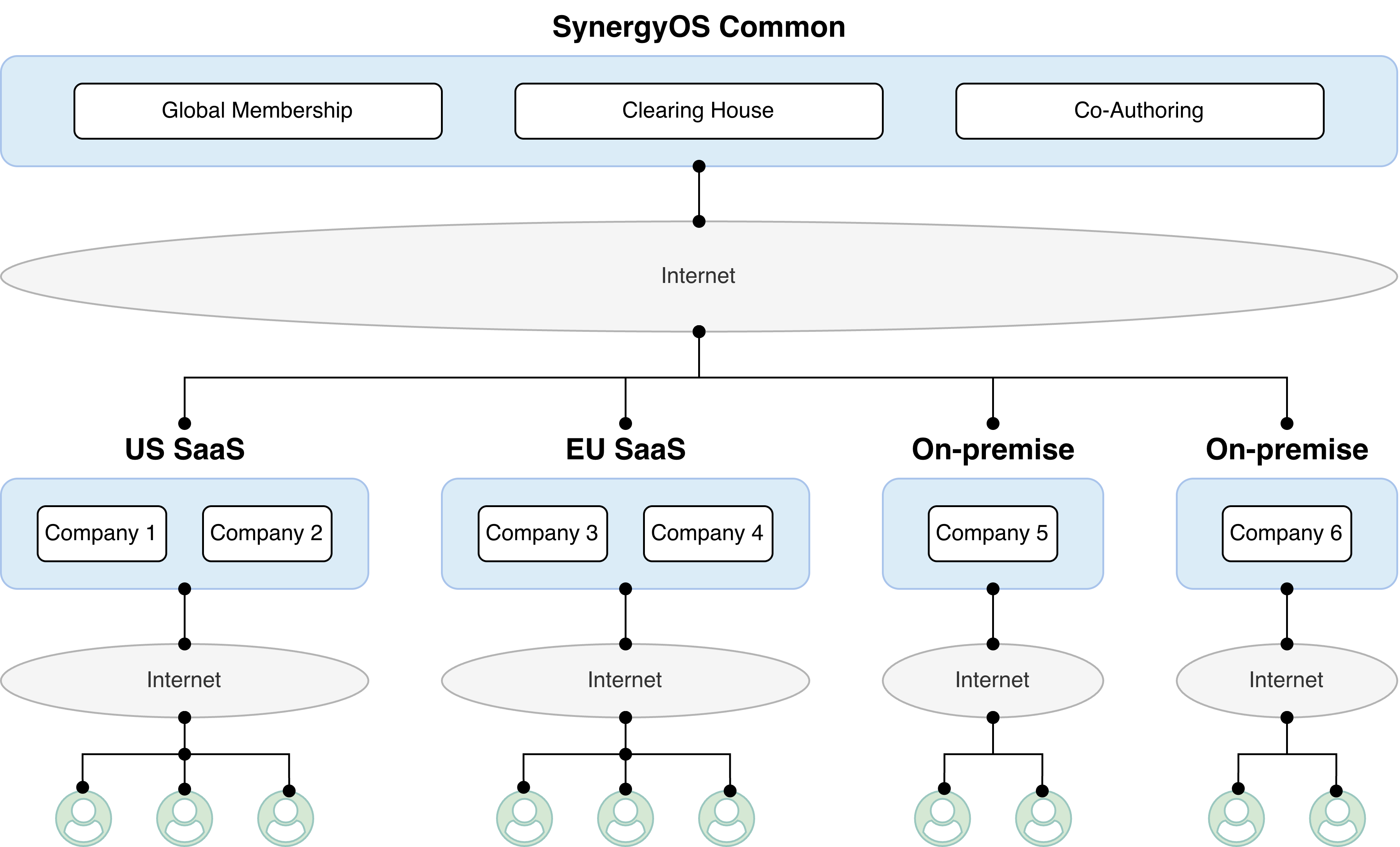
SynergyOS is designed as a modular, unified platform for all your knowledge work. Key architectural principles:
- Unified data model: All information (files, emails, tasks, notes, chats) is stored as "items" in a single, permissioned folder structure.
- Modular apps: Core and optional apps (Drive, Email, Chat, Tasks, etc.) run on top of the same foundation.
- APIs & integrations: Open APIs and connectors let you extend or automate workflows.
- Enterprise-grade security: Built-in compliance, audit, and granular permissions.
- Flexible deployment: Cloud, hybrid, or on-premises options.
Federated Network (SynergyOS Common)
SynergyOS operates as a federated network. The SynergyOS Common layer provides core services shared across all infrastructures:
- Global Membership: Central directory of all user accounts and repositories. Issues authentication tokens and enforces access across nodes.
- Clearing House (WIP): Coordinates and synchronizes data across different infrastructures and companies.
- Co-Authoring Engine: Enables real-time collaboration using integrations like Microsoft Online (WOPI), Collabora Online, and other document editors.
Multi-Region & Dedicated Infrastructures
By default, SynergyOS runs regional SaaS instances (e.g., US SaaS, EU SaaS). Clients may also deploy:
- Enterprise Cloud: Dedicated, single-tenant cloud environment managed by SynergyOS.
- Enterprise Server: Self-hosted deployment (on-premises or cloud) for complete control.
Users connect to the specific infrastructure hosting their repository, ensuring low latency and compliance with local data regulations.
Who Should Use This Guide?
- IT administrators deploying or managing SynergyOS
- Security & compliance teams reviewing architecture and controls
- Technical decision makers evaluating platform fit
- Partners & consultants supporting SynergyOS rollouts